
TL;DR:
- Digital tools can enhance creativity, accessibility, and documentation in remote jam sessions.
- Proper setup and communication are essential for overcoming technical challenges and maintaining connection.
- Blending live and asynchronous formats, along with disciplined practice, maximizes collaboration success.
Many musicians assume that adding digital tools to a jam session will kill the spontaneity. That instinct is understandable, but it's wrong. Empirical data drawn from 15 studies shows that digital collaboration tools measurably improve musical skills, creativity, and motivation. Far from being a barrier, the right technology can open doors you didn't know existed. This guide walks you through exactly how these platforms work, what the research says about their creative impact, and how to use them in ways that feel natural rather than forced. Whether you're organizing your first online session or looking to level up an existing setup, you'll find practical answers here.
Table of Contents
- How digital tools are reshaping jam sessions
- Digital tools in action: mechanics, best practices, and creative gains
- Balancing creative flow, connection, and technology challenges
- From theory to practice: getting more from digital jam sessions
- A fresh perspective on digital music collaboration
- Take your jam sessions to the next level with JamClub
- Frequently asked questions
Key Takeaways
| Point | Details |
|---|---|
| Remote collaboration unlocked | Digital tools now allow musicians to jam together in real-time or asynchronously from anywhere. |
| Boosts creativity and skills | Empirical studies link digital music tools with significant growth in creativity and musical ability. |
| Challenges remain | Technical hurdles and feelings of disconnection can arise but are manageable with best practices. |
| Practical setup matters | Optimizing your digital setup is critical to getting the most out of online jam sessions. |
How digital tools are reshaping jam sessions
Digital platforms have changed what a jam session even means. You no longer need everyone in the same room, or even the same time zone. There are two main formats to understand: real-time remote jams and asynchronous jams.
Real-time jams happen live over the internet. Everyone plays simultaneously, and the goal is to keep latency (the delay between playing a note and hearing it) low enough that the music feels tight. Asynchronous jams work differently. One musician records a part, uploads it, and another adds their layer later. Think of it like a musical conversation over text, except the messages are riffs.
Digital tools enable both formats through low-latency audio streaming, real-time MIDI transmission, and cloud-based DAW (digital audio workstation) syncing. MIDI, which stands for Musical Instrument Digital Interface, lets instruments communicate digitally with near-zero delay. Cloud DAWs let multiple musicians edit the same project file from different locations.
Here's a quick look at how popular platforms compare:
| Platform | Best for | Key feature | Latency |
|---|---|---|---|
| Telemidi | Live MIDI jams | Real-time MIDI sync | Very low |
| JamKazam | Live audio jams | High-quality audio codec | Low |
| BandLab | Async collaboration | Cloud DAW, free | None (async) |
| Soundtrap | Async + education | Browser-based DAW | None (async) |
Platforms like Telemidi and JamKazam use peer-to-peer synchronization and specialized audio codecs to keep live jams feeling responsive. Codecs compress and decompress audio in real time, preserving quality while reducing the data load.
What does this mean for you practically? A few key benefits stand out:
- Global reach: You can jam with a drummer in Tokyo and a bassist in Berlin from your living room.
- Scheduling flexibility: Async tools let collaborators contribute on their own schedule.
- Better documentation: Cloud DAWs automatically save every take, so nothing gets lost.
- Sound quality: Modern codecs rival studio-grade audio for many applications.
For musicians interested in collaboration and community, these platforms remove geographic and logistical barriers that used to make regular jamming nearly impossible. And if you're thinking about releasing the music you create, it's worth understanding music mastering for streaming so your final tracks sound polished across all platforms.
Digital tools in action: mechanics, best practices, and creative gains
To make technology work for your music, it's useful to understand the mechanics and evidence behind these tools.
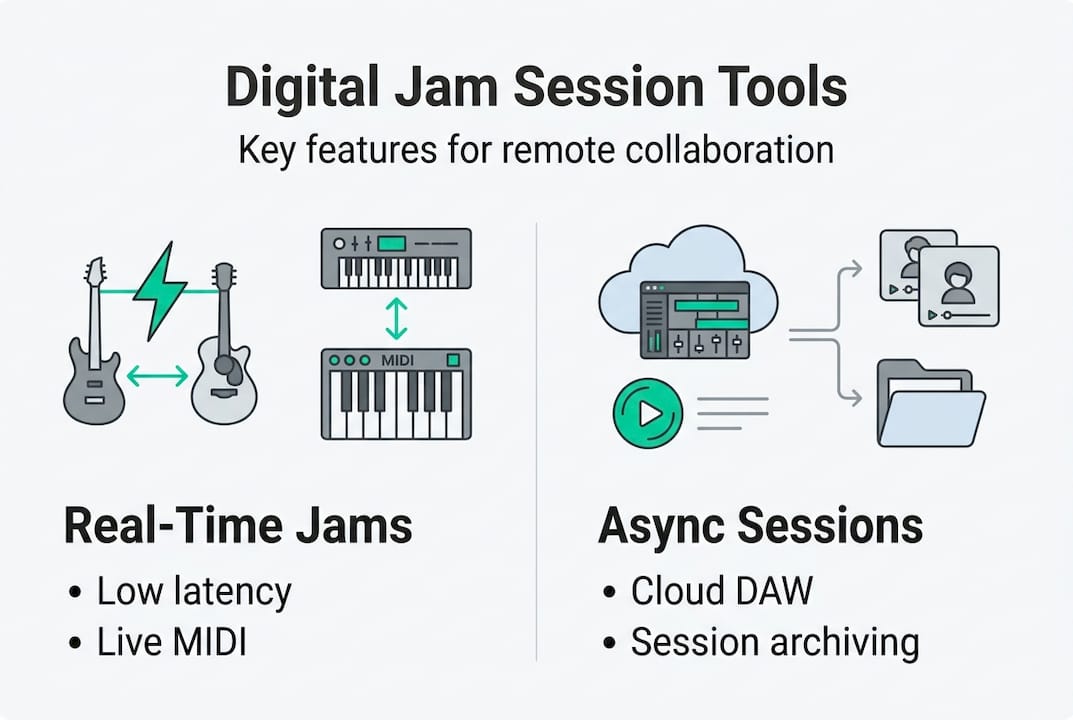
Under the hood, real-time collaboration relies on three main processes: peer-to-peer audio streaming, real-time MIDI transmission, and cloud DAW syncing. Each one has its own demands on your hardware and internet connection. Understanding this helps you troubleshoot problems before they derail a session.
Here's a step-by-step checklist to optimize your setup:
- Use a wired Ethernet connection. Wi-Fi introduces unpredictable delays. A cable keeps your connection stable.
- Set your DAW sample rate to 48kHz. This is the standard for most collaboration platforms and reduces conversion errors.
- Lower your audio buffer size. A buffer size of 64 or 128 samples keeps latency minimal for live play.
- Use a dedicated audio interface. Built-in laptop sound cards are rarely fast or clean enough for serious sessions.
- Close background apps. Streaming video or running updates while jamming will spike your CPU load and cause audio dropouts.
- Test before the session. Run a quick soundcheck with your collaborators 10 minutes before you start.
Pro Tip: Record every session, even informal ones. Reviewing your own playing alongside others is one of the fastest ways to identify gaps in your rhythm and timing.
The research backs up the value of this kind of disciplined practice. Empirical studies show significant improvements in creative flexibility, rhythmic precision, and music theory understanding among musicians who use digital collaboration tools regularly. The gains aren't just technical. Musicians report feeling more confident experimenting because the digital environment lowers the stakes of making mistakes.
That said, there are real challenges. The learning curve for DAW software can be steep, especially for musicians who have always worked acoustically. Motivation can also dip when sessions feel more like tech support than music-making. Following jam session best practices from the start helps you avoid the most common pitfalls. If you're also thinking about organizing events around these sessions, resources on how to plan vibrant jam sessions can make the whole process smoother.
Balancing creative flow, connection, and technology challenges
Mastering the technology is only part of the story. Next, we examine its real-world impacts on creative dynamics.
Digital tools bring genuine advantages to the creative process. They widen access so that musicians who can't afford rehearsal spaces or who live in areas with small music scenes can still find serious collaborators. Automation features in modern DAWs handle repetitive tasks like tempo syncing and track organization, freeing you to focus on playing. Some platforms even introduce AI-generated musical ideas that can spark unexpected directions in a jam.
One emerging concept worth knowing is dissensus, a model where collaborators intentionally introduce conflicting musical ideas to generate creative tension. AI bandmates can simulate this by responding to your playing in unexpected ways, pushing you out of familiar patterns. It's a genuinely useful tool for breaking creative ruts, even if it feels strange at first.
But the challenges are real too. Here's an honest look at both sides:
- Pros: Global access, flexible scheduling, built-in recording, AI-assisted creativity, lower costs
- Cons: CPU overload during complex sessions, audio dropout frustration, potential creative disconnection, steep learning curve
Digital tools democratize music but can also make artists feel isolated or overwhelmed, especially when technical problems interrupt the flow. That feeling of disconnection is one of the biggest risks of moving jams online.
"The best online jams I've been part of all had one thing in common: everyone showed up ready to listen, not just play."
Counteracting isolation takes intentional effort. Start sessions with a few minutes of casual conversation before playing. Use video alongside audio so you can read each other's body language. Rotate who leads the jam so everyone feels ownership. These small habits keep the human connection alive even through a screen.
Pro Tip: Schedule a short debrief after each session. Talking about what worked and what didn't builds trust faster than any amount of technical polish.
Exploring global collaborations can also expand your musical vocabulary in ways that local jams rarely do. And if you want to understand why the social side matters so much, reading about how to boost musical connection offers a useful frame.
From theory to practice: getting more from digital jam sessions
With the right mindset and strategies, these platforms can bring out your best collaborative music moments.
Here's a practical four-step process for running a successful digital jam:
- Set a clear goal. Decide before the session whether you're improvising freely, working on a specific song, or recording a demo. Ambiguity kills momentum.
- Choose the right tool for the format. Use JamKazam or Telemidi for live play. Use BandLab or Soundtrap for async layering. Don't force a live platform onto an async workflow.
- Prep your session environment. Tune your instrument, set your levels, and confirm everyone's connection quality before you start. Low-latency platforms only work well when your local setup is dialed in.
- Review and iterate. After the session, listen back together. Identify one or two things to improve next time. This turns casual jams into real skill-building.
Combining live and async formats often produces the best results. Start with a live session to capture energy and ideas, then use an async tool to refine and layer parts at your own pace.
Here's a quick comparison of leading platforms to help you choose:
| Platform | Live or async | Best use case | Cost |
|---|---|---|---|
| JamKazam | Live | Band rehearsals, live improv | Free/paid |
| Telemidi | Live | MIDI instrument jams | Free |
| BandLab | Async | Songwriting, demo recording | Free |
| Soundtrap | Async | Education, beginner collabs | Free/paid |
Staying motivated over time is its own challenge. Joining a broader music community gives you accountability and fresh collaborators when your usual circle goes quiet. Keeping an eye on where creativity and connection in 2026 are heading can also help you stay ahead of new tools and trends as they emerge.
A fresh perspective on digital music collaboration
Most musicians who struggle with digital jams blame the technology. The platform was glitchy. The latency was too high. The interface was confusing. These complaints are real, but they're usually symptoms of a deeper issue: people focus on the tools instead of the workflow.
Here's what actually separates musicians who thrive in digital collaboration from those who give up after two sessions. It's not the platform they chose. It's the discipline they bring to preparation and communication. A mediocre platform with a well-prepared group will outperform a premium setup with no shared expectations every single time.
Seasoned remote musicians will tell you the same thing. The technical specs matter less than you think after a certain baseline. What matters is showing up consistently, communicating clearly about creative direction, and being willing to embrace imperfection. In fact, growing faster through skill sharing with peers who challenge you is far more valuable than chasing the lowest latency number.
The counterintuitive insight worth sitting with: intentional imperfection, letting a take be rough, letting a musical idea clash with another, often produces the most interesting results. Dissensus isn't a bug. It's a feature.
Take your jam sessions to the next level with JamClub
If you're ready to put today's insights into action, here's how JamClub can help.
JamClub is built specifically for musicians who want to find, join, or host jam sessions without the usual friction. Whether you're looking for a live session nearby or want to organize your own online jam with RSVP management and real-time messaging, the JamClub platform puts everything in one place.
You can report a jam happening in your area to help other musicians find it, or start your own jam and invite collaborators who match your style and skill level. JamClub is free to use, so the only thing standing between you and your next great session is hitting that first button.
Frequently asked questions
Which digital tools are best for organizing live jam sessions?
Platforms like Telemidi and JamKazam offer top-tier low-latency and real-time features that make them the strongest choices for live online jams.
How can I minimize latency during an online jam session?
Use a wired Ethernet connection, set your DAW to 48kHz sample rate, and keep your audio buffer size as low as your computer can handle without dropouts.
Do digital tools affect creativity in music collaboration?
15 empirical studies show digital tools improve musical skills, creativity, and flexibility, though the early learning curve can temporarily slow creative momentum.
Can AI bandmates replace human musicians in jam sessions?
AI bandmates simulate collaboration and can push creative boundaries, but they don't replicate the full spontaneity and emotional depth of playing with real people.
Recommended
- Our Platform - Find & Create Jam Sessions Easily | JamClub
- Music sharing online: Boost collaboration and community
- Music community checklist for successful jam sessions
- JamClub - Find Musicians & Jam Sessions Near You | Music Community App
- Essential Tips for Maximizing Your Band's Rehearsal Time | MusicStreet